How Can I Use Instagram Stories Call To Action?
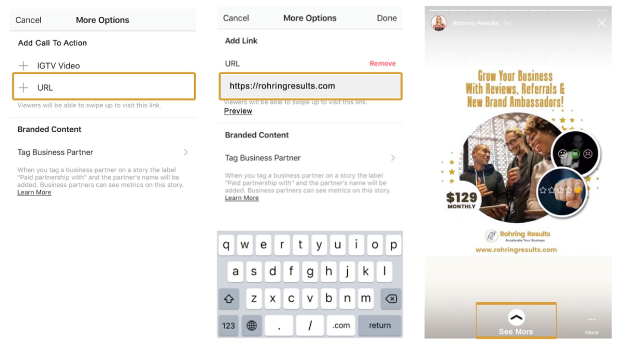
As of now, Call To Action link is only available to business profiles (not personal profiles) that have over 10,000 followers on Instagram. However, Instagram Story analytics still do not currently track URL clicks. What Rohring Results suggests for you to do to measure your traffic and conversions is to use a link shortener so you can track the CTA clicks separately.
Here’s an illustration that shows the steps on how to add Call To Action link below your Instagram Stories.
When Should You Use Facebook & Instagram Stories?
If your target market is on either of these two social giants, then you should be too!
So, if you are not using Facebook or Instagram Stories for your business – What are you waiting for? Now is the perfect time to highlight your products, services, and company culture on Instagram Stories.
Can You Repurpose & Link Instagram Stories for Your Facebook Business Page Stories?
Definitely! If you want to test Facebook Stories for your brand, repurposing the content that you’ve already created for Instagram Stories is a great place to start.
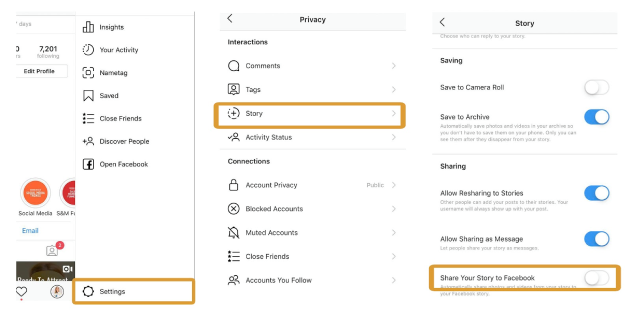
To repurpose your Instagram Stories to Facebook Stories, follow these 3 simple steps: (illustration below)
Step 1: Go to your Instagram Account Settings
Step 2: Select Privacy
Step 3: Select Story and Scroll Down to enable “Share Your Story to Facebook”.

How Can I Decide Which Story Platform To Use?
Facebook or Instagram?
As a business owner, you can decide which platform to use by identifying your target audience and finding out which platform they use. Brands and small businesses should choose platforms where they can reach their target audience efficiently.
If you’re doing good on both platforms, then you can utilize the two Stories platform. All you have to do it test, and whichever performs better that’s the time you can decide which story platform to use.
How to Create Successful Story Ads for Facebook and Instagram?
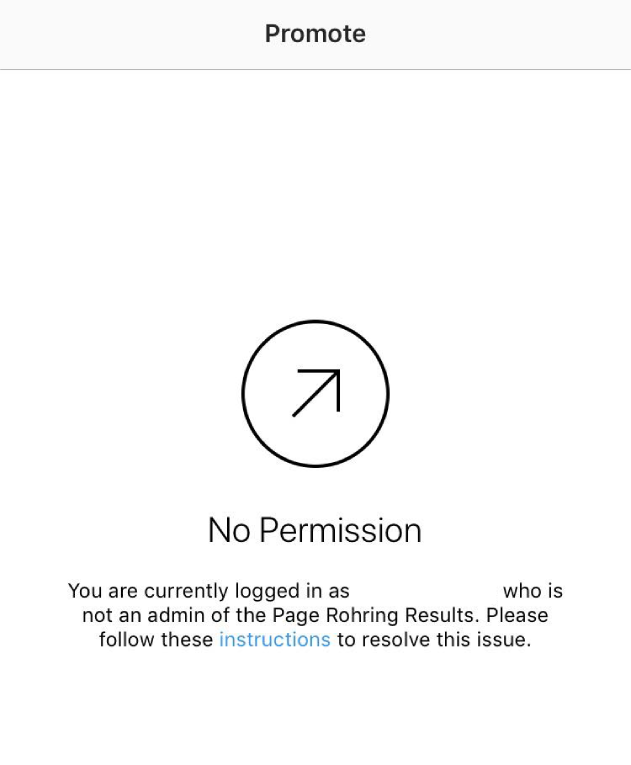
Since Instagram Ads is going to use your Facebook Business Manager, before you can create Instagram Stories ads, you first need to connect your Instagram to your Facebook Page to identify a connected ad account. If you are using a different Facebook Account, it can potentially lead to permission error.
Once you’ve connected your Instagram account to the Facebook page, simply follow these steps:
1. Log in on your Facebook Ads Manager and Create Ad.
2. Choose your objective. For Instagram Stories ads, you are limited to one of these five objectives – Reach, Video Views, Traffic, Conversions, and App Installs.
3. For this example, let us choose Traffic objective.
4. Name Your Campaign
5. After naming your campaign, the next step is to select where you want to drive traffic to.
6: The next step is to define your target audience. Just like any Facebook ad, you can set-up your audience targeting as a new custom audience, saved, or a lookalike audience.
7. Then select the Placements of your ad. Since we are doing Instagram Stories Ad, make sure that “Stories” is the only one checked in the Placements.
8. Set-up your budget and select the scheduled date for the ad.
9. Select the Facebook page associated with the Instagram account.
10. Select the ad format and upload your media.
– Images will play for 5 seconds.
– Videos will play for 15 seconds.
– The carousel ad allows you to use up to 3 pieces of content,
that’s both images or videos in one single ad.
11. Since we’re doing Traffic campaign, we need a website URL we to drive traffic. I also highly recommend for you to use a URL shortener to track the progress of the click links and to help track the campaign you’re running.
12. Choose a relevant Call-to-action button for your campaign.
13. Once you have completed all the steps and happy with your Instagram Stories Ad, click “Confirm” to place the order.
Now that you have the knowledge in creating an Instagram Stories Ad, let us share with you our best practices when it comes to running Instagram Stories Ads.
– Keep Your Messaging Short: Just like Facebook Ads, promotions run better with less to none texts.
– Be creative. Try out different things, make it interesting, fun, and must be on point. A|B test your ads!
– Create a strong CTA. Use a strong Call To Action to target people using emotional triggers that drive action.
– For businesses, it’s important you include your brand’s logo. It is your identity and building that trust through repetition!
– Plan your text placement. Many people nowadays know the difference between regular stories and sponsored stories.