If your website isn’t showing up on Google, you’re not alone. Many business owners struggle with low search rankings, which can hurt visibility, traffic, and ultimately, sales. The good news? There are proven fixes to improve your rankings and get your business noticed online. And as a business owner, you understand the importance of being visible online. But what if your website isn’t showing up on Google search results? You’re not alone. Many businesses struggle with low search rankings, making it difficult for potential customers to find them.
If you’re wondering why your website isn’t appearing where it should, this guide will walk you through five essential fixes for low search rankings to help boost your online visibility.
Why Isn’t My Website Ranking on Google?
Several factors could be keeping your website from ranking on Google, including:
- Weak or No SEO Strategy – If your site isn’t optimized for search engines, it won’t rank.
- Lack of Local SEO – If you’re a local business, missing Google Business Profile optimization can hurt rankings.
- Technical Issues – Errors like slow site speed, mobile incompatibility, or indexing problems can affect visibility.
- Low-Quality or No Content – Thin or irrelevant content can prevent your site from ranking.
- Lack of Backlinks – If your website isn’t getting links from reputable sources, it may not be seen as trustworthy.
Now, let’s look at the five key fixes for low search rankings and how you can improve your website’s performance.
1. Optimize Your Website for Search Engines
Before your website can rank, Google must be able to find and understand it. If your site isn’t optimized for search engines, it will struggle to appear in search results.
How to Fix It:
✅ Ensure your website is indexed by checking Google Search Console (search for “site:yourwebsite.com” in Google).
✅ Use relevant keywords in your page titles, headers, and meta descriptions.
✅ Create SEO-friendly URLs (e.g., use yourdomain.com/local-seo-tips instead of yourdomain.com/page123).
✅ Make sure your site loads quickly and is mobile-friendly.
How do I check if Google is indexing my website properly?
To see if Google has indexed your website, go to Google Search Console and check the Coverage Report. You can also type “site:yourdomain.com” in Google’s search bar—if your pages don’t appear, they may not be indexed. Make sure your site has a valid sitemap and no crawl errors preventing Google from accessing your content.
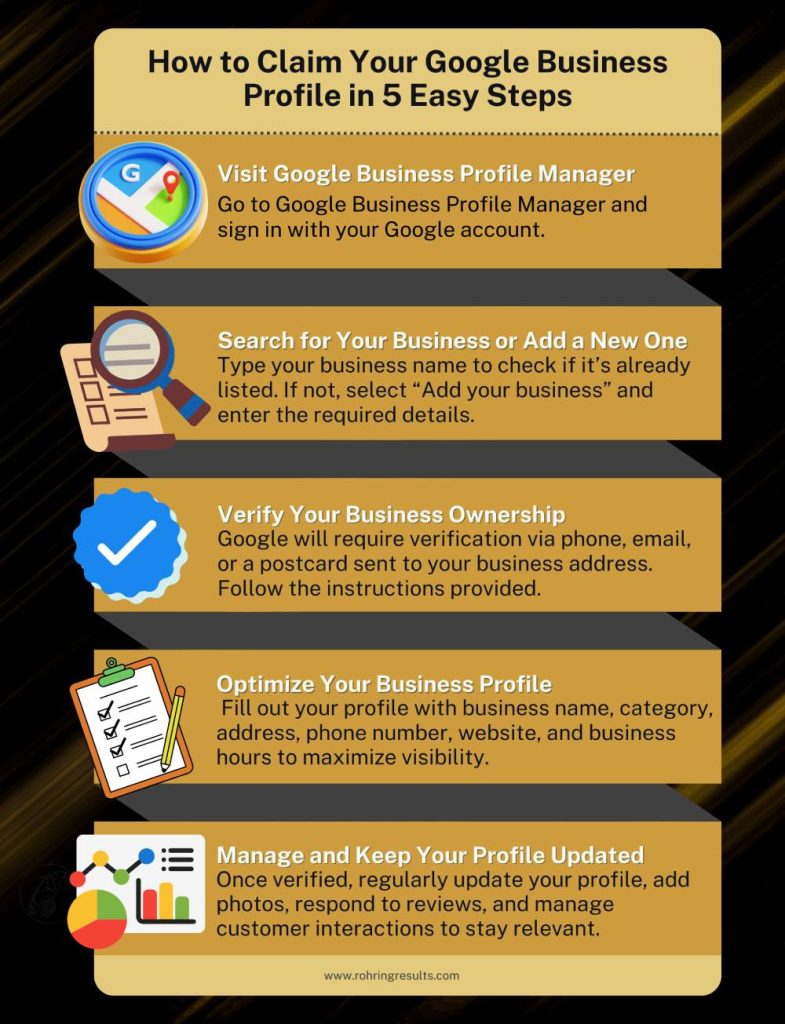
2. Claim and Optimize Your Google Business Profile (GBP)
If you’re a local business, your Google Business Profile (formerly Google My Business) is critical for local search rankings. Without a properly optimized GBP, your business may not show up in Google Maps or local search results.
How to Fix It:
✅ Claim and verify your GBP listing if you haven’t already.
✅ Ensure your business name, address, and phone number (NAP) are consistent across all platforms.
✅ Add high-quality photos, business categories, and a detailed description with localized keywords.
✅ Encourage customer reviews and respond to them regularly.
3. Improve Your Website Content with Relevant Keywords
Content is king when it comes to SEO. If your website doesn’t have enough valuable and keyword-rich content, it won’t rank well.
How to Fix It:
✅ Create high-quality blog posts, service pages, and FAQs targeting relevant search terms.
✅ Use long-tail keywords specific to your industry and location (e.g., “best plumber in Orlando” instead of just “plumber”).
✅ Answer common customer questions in your content to improve engagement and SEO ranking.
✅ Avoid duplicate content—Google penalizes websites with copied or repeated text.
4. Fix Technical SEO Issues
Technical problems can prevent Google from properly crawling and ranking your website.
How to Fix It:
✅ Check for broken links and fix any 404 errors.
✅ Improve website loading speed by compressing images and using fast hosting.
✅ Ensure your site is mobile-friendly—Google prioritizes mobile-optimized sites.
✅ Use an SSL certificate (HTTPS) to secure your website.
Why is my website slow, and how does it affect my SEO rankings?
A slow-loading website can negatively impact user experience and search rankings. Google prioritizes fast, mobile-friendly sites because slow speeds increase bounce rates. To improve speed, compress images, enable caching, use a content delivery network (CDN), and choose reliable hosting. Run a Google PageSpeed Insights test to identify and fix speed issues.
What is an SSL certificate, and why is HTTPS important for SEO?
An SSL certificate (Secure Sockets Layer) encrypts data between your website and visitors, ensuring secure connections. Google favors HTTPS websites because they provide a safer browsing experience. Sites without HTTPS may show a “Not Secure” warning in browsers, discouraging visitors and harming SEO rankings. You can get an SSL certificate from your web host and enable it to improve both security and rankings.
5. Build High-Quality Backlinks
Backlinks (links from other websites to yours) are a major ranking factor. If your site lacks backlinks, Google may not see it as trustworthy.
How to Fix It:
✅ Get listed on local directories and industry-related websites.
✅ Partner with local businesses for cross-promotion and backlinks.
✅ Publish guest posts on reputable sites in your industry.
✅ Create shareable content, such as infographics, guides, and expert insights.
The Importance of Backlinks for SEO Success
Backlinks play a critical role in Google’s ranking algorithm , helping websites gain authority, visibility, and higher search rankings.
Sources: Ahrefs, Moz, SEMrush
Final Thoughts
If your website isn’t showing up on Google search results, it’s time to take action. By applying these five fixes for low search rankings, you can improve your site’s visibility, attract more customers, and grow your business.🚀 Need expert help with SEO?Rohring Results specializes in SEO company for small businesses—helping companies like yours rank higher, get more leads, and dominate local search results. Contact us today!
Rohring Results is your partner in driving business success. As a leading Business Growth Consultant, we offer tailored business growth consulting services that focus on uncovering the unique strengths of your business and using them to fuel growth. With a deep understanding of your business’s needs, we provide strategies that not only elevate your brand but also expand your reach and impact.

⬇️ Find us on Google Maps! Digital Marketing Agency in Bradenton ⬇️